
Each month

The month closes

Every entry from the month becomes the period's VAT figures, its income statement and balance sheet, and each apartment's own profit line. This is the part you do not do.

The story

One month, from entries to statements

Every screen in this story is an illustration of the interface, not a screenshot. The real ones are below.

01 — Fill

The month's entries land here.

Every entry from the month lands in the same ledger, one after another, continuing the voucher sequence exactly where the last period left off.

LedgerJanuary 2026
#118Cleaning — Apartment 2Brought forward150,60 €

Hash 70aebdd75b12c538…

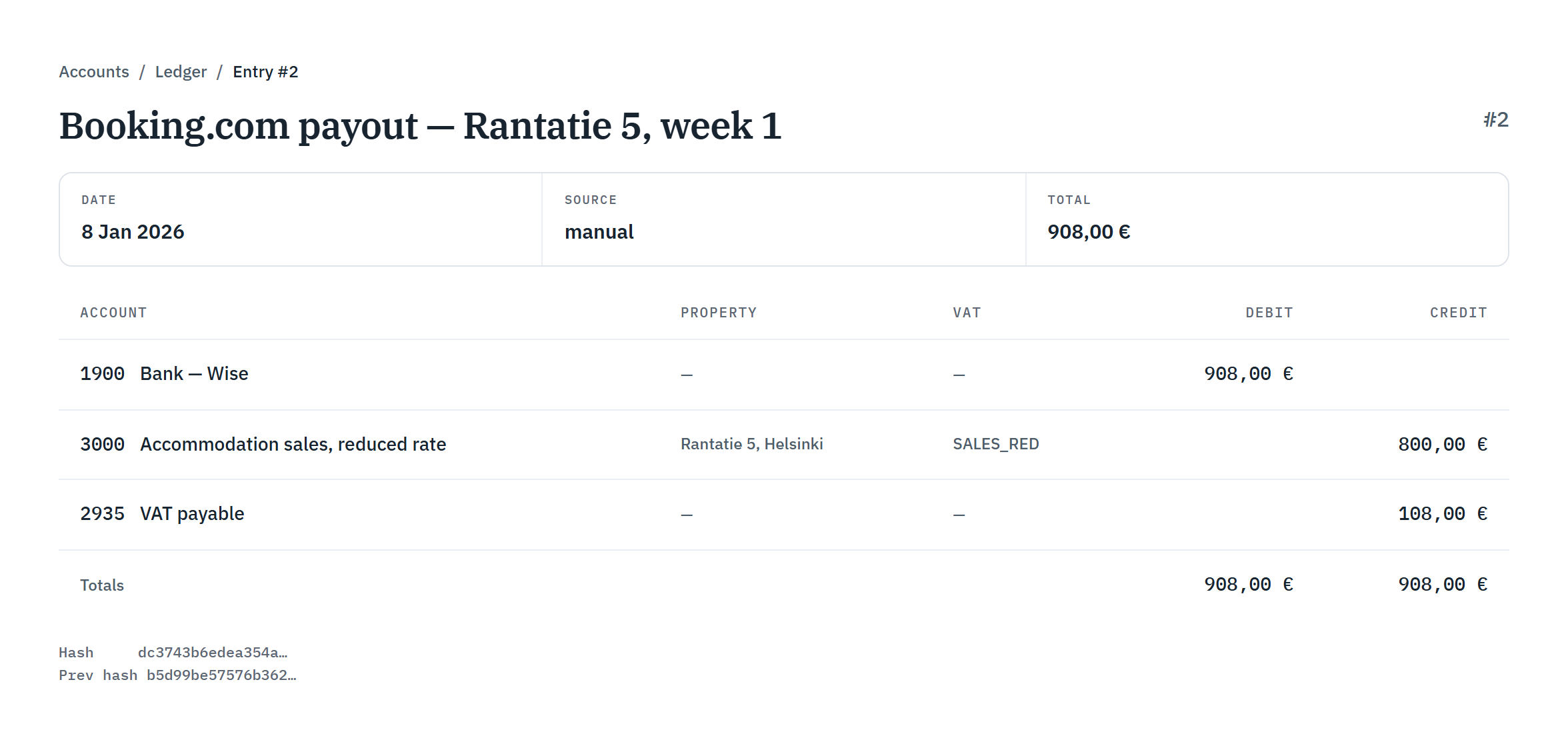
#119Accommodation — Rantatie 5908,00 €
#120Commission120,00 €
#121Cleaning — Keskuskatu 10 A394,13 €

02 — VAT

It sorts itself by rate.

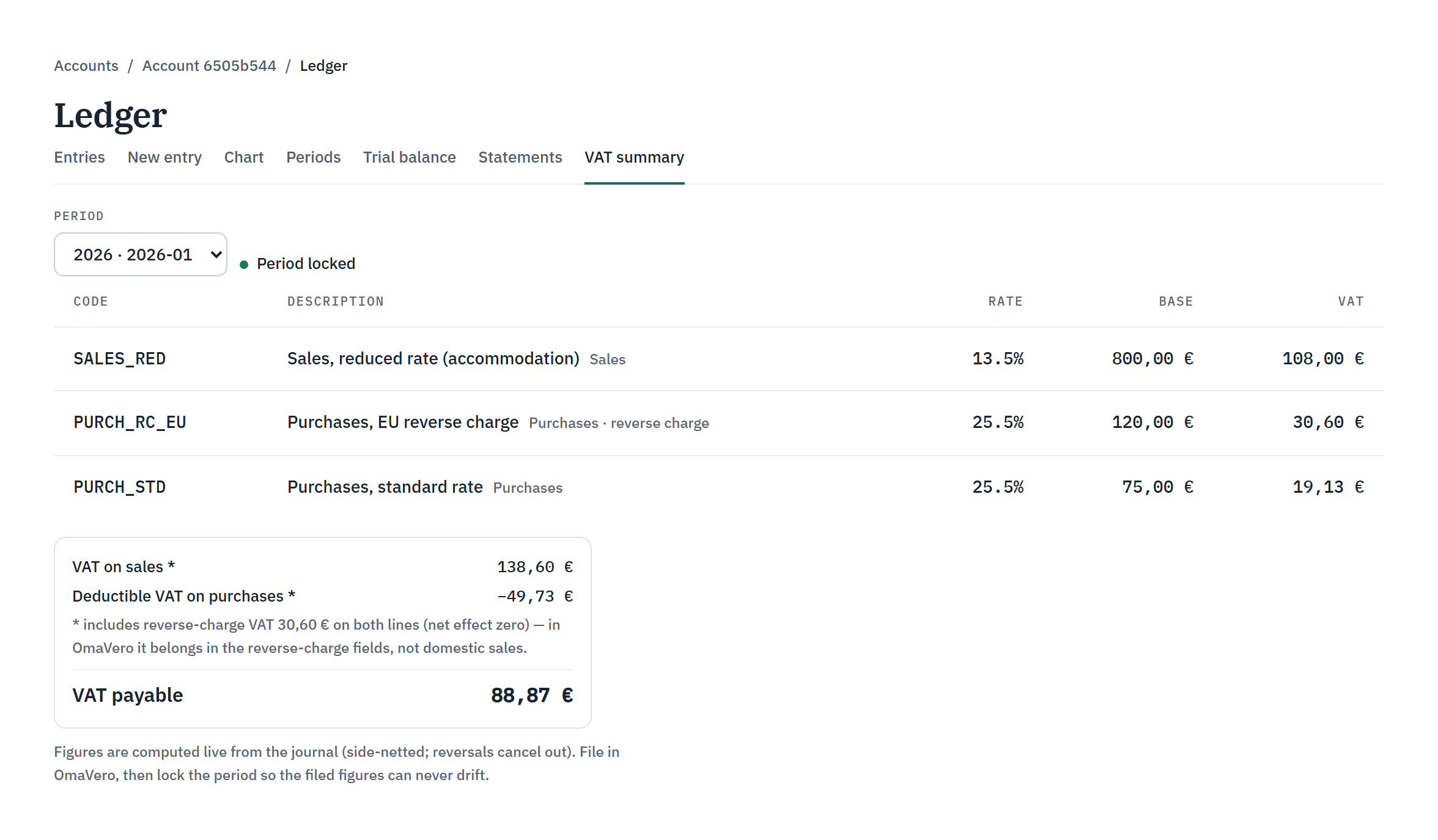
Your VAT for each period, calculated at the correct Finnish rates and filed in OmaVero for you.

Including the 13,5 % accommodation rate in effect since 1 January 2026.

VAT summaryJanuary 2026
EntryNetVAT
Accommodation — Rantatie 513,5 % sales800,00108,00
Commission25,5 % reverse charge120,0030,60
Cleaning — Keskuskatu 10 A325,5 %75,0019,13
Output
138,60 €
Deductible
−49,73 €
Payable
88,87 €

03 — Statements

It becomes two statements.

An income statement and a balance sheet for the period.

StatementsJanuary 2026

Income statement

Revenue
800,00 €
Expenses
195,00 €
Result
605,00 €

Balance sheet

Assets
5 113,60 €
Liabilities
638,60 €
Equity
4 475,00 €

04 — Apartments

It splits by apartment.

The profit of each apartment on its own.

Per apartmentJanuary 2026

Rantatie 5

680,00 €

Keskuskatu 10 A3

−75,00 €

Sum
605,00 €

All of it in your own login, whenever you want to look.
The rhythm

What actually happens, in order

  1. 01

    Everything for the period is gathered

    Every approved entry belonging to the period — your income, your costs, the VAT on each — is brought together against the bank.

  2. 02

    The VAT figures are worked out

    At the correct Finnish rates, including the 13,5 % accommodation rate in force since 1 January 2026. These are the figures that go into OmaVero, and we file them for you. On the €99 service we also watch OmaVero for what comes back.

  3. 03

    The period is locked

    Once the return is filed the period is closed, so what was reported cannot drift afterwards. A correction after that point is a new entry that reverses the old one, and it is visible as exactly that.

  4. 04

    The statements come out

    An income statement, a balance sheet, and each apartment's own profit worked out separately — so you can see which flat is carrying the others.

The application

The same month, in the app

Not illustrations. Two screens from the running application, at the two moments that matter most.

A posted ledger entry in the app, showing its account lines, VAT and totals, and the entry's hash and previous-hash values.
A posted ledger entry: its lines, its totals, and its hash.
The VAT summary page in the app, showing VAT figures by code for a locked period, as filed in OmaVero.
The VAT summary for a locked period — the figures that go into OmaVero.

What holds it together →

Get started

Your month, kept for you

Tell us about your properties and we will tell you plainly whether we can help.

Talk to us